How to use

ATT&CK Workbench · first-use guide

Use the workbench without turning ATT&CK into bingo

This is a decision workflow, not a technique colouring exercise. Start with the job you need to do, preserve what is observed versus inferred, and only claim the capability or attribution your evidence supports.

Choose the job, not the technique

The first screen asks what decision you are trying to make. If you already know a technique ID, that still does not tell you which analytical job needs doing.

Triage · Hunt · IR

Analyse evidence

Use when you have a message, event, command, process or behaviour and need a defensible candidate mapping.

SOC · Detection

Assess defensive coverage

Use when you need to separate telemetry, analytic, validation and operational readiness.

CTI · Research

Explore threat intelligence

Use when you need official group, alias, procedure and source context without assuming current attribution.
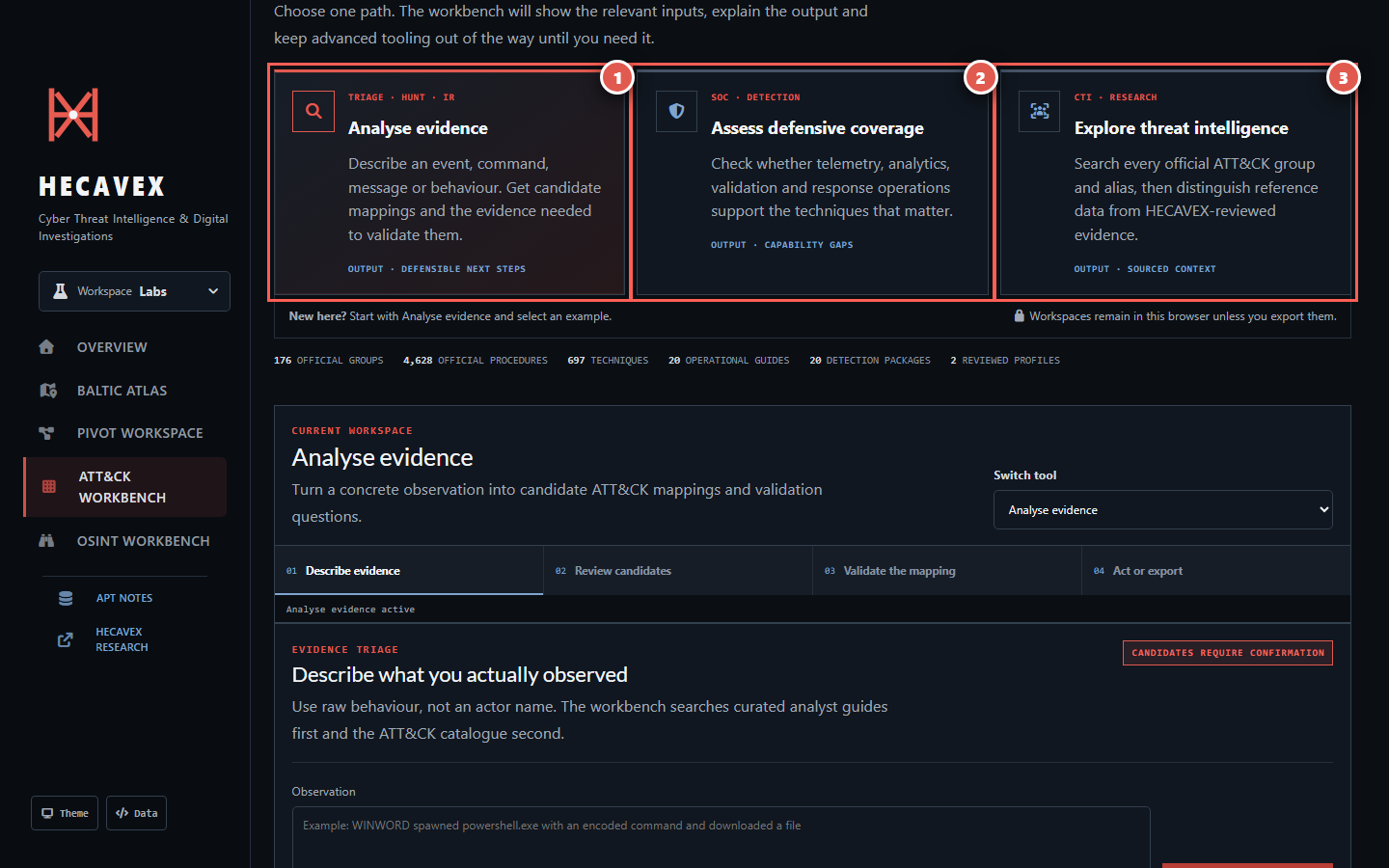
ATT&CK Workbench home with Analyse evidence marked 1, Assess defensive coverage marked 2 and Explore threat intelligence marked 3
Numbers in the guide correspond to the red markers in each screenshot. Open an image for the full-size view.
  1. Analyse evidenceBegin with a concrete observation. The output is a documented assessment, not an automatic verdict.
  2. Assess defensive coverageBegin with an environment and threat focus. The output is a local capability record.
  3. Explore threat intelligenceBegin with an actor name, alias, group ID or behaviour. The output retains official sources and boundaries.

Analyse evidence: candidate first, conclusion later

Describe what happened without putting an actor name or preferred technique into the observation. The workbench ranks possible interpretations, then requires you to record supporting evidence, gaps and a competing explanation.
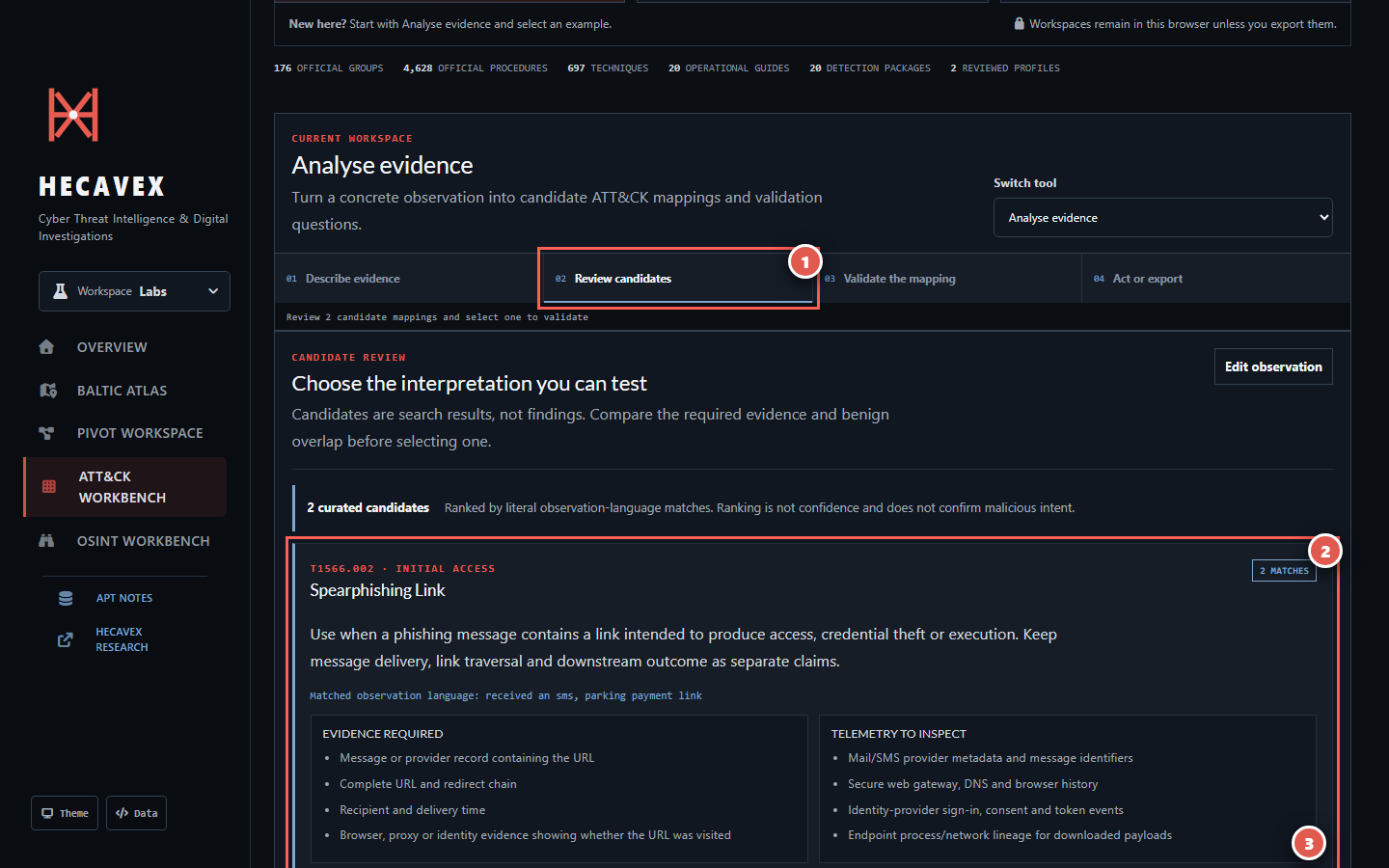
Evidence candidate review with the active step marked 1, the first candidate marked 2 and its actions marked 3
Example shown: an SMS parking-payment lure. The candidate rank is a language match, not confidence or proof of malicious intent.
  1. Follow the numbered stageThe active stage states what decision is expected. You can move back without losing the current observation.
  2. Read the whole candidateCheck evidence required, telemetry to inspect, benign overlap and next pivots before selecting anything.
  3. Select the correct actionSelect for validation opens the assessment. Add as suspected incident mapping preserves it as suspected rather than confirmed.
Boundary: “Matched observation language” explains why a candidate appeared. It is not confidence, attribution or confirmation that execution succeeded.

Assess coverage: four claims, one aggregate state

Coverage is only meaningful inside a documented environment and threat scope. A rule name alone cannot prove collection quality, validation or an operational alert path.
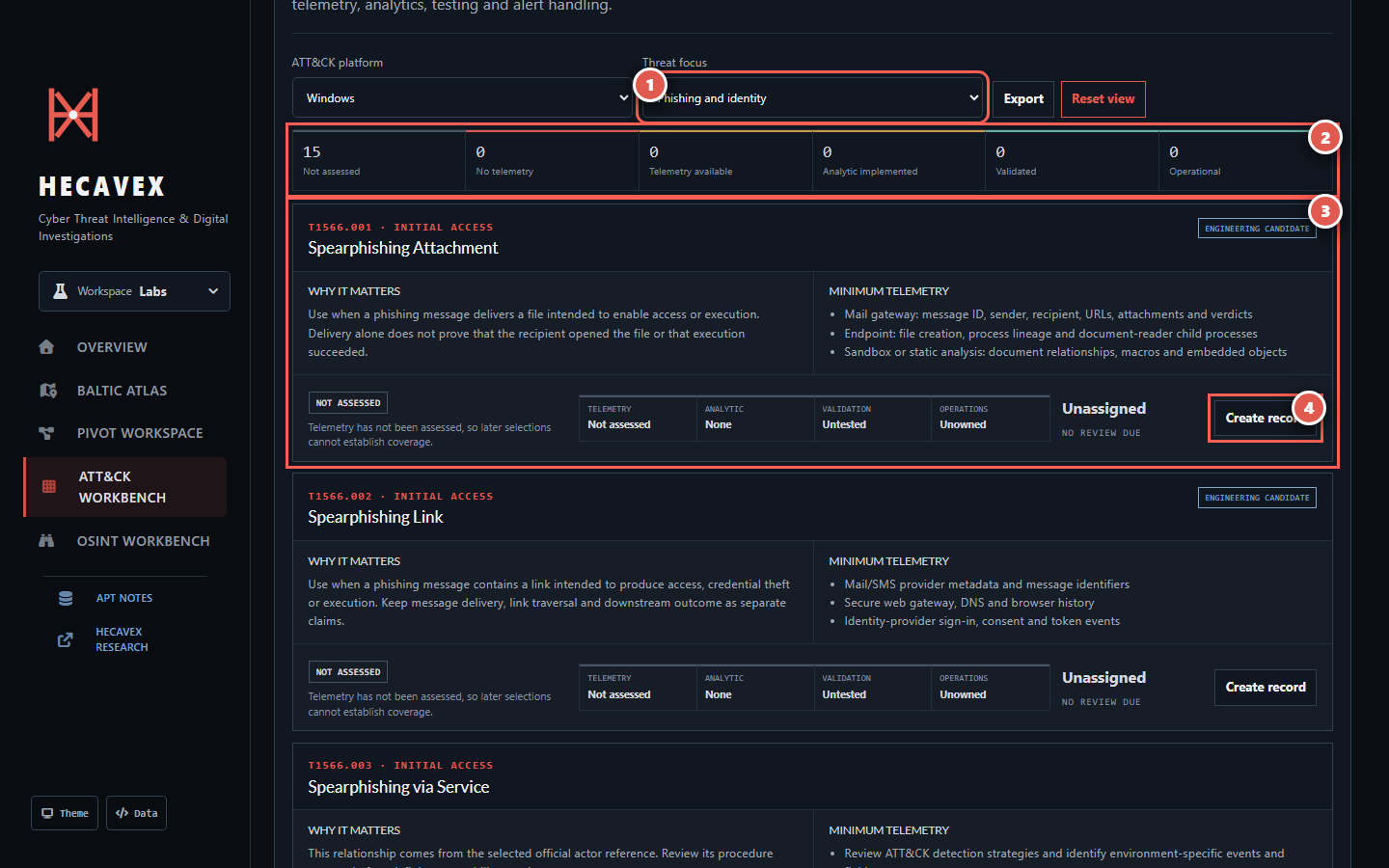
Defensive coverage workspace with threat focus marked 1, summary marked 2, technique card marked 3 and Create record marked 4
The technique card explains both why the behaviour matters and the minimum telemetry needed before a capability claim is made.
  1. Set the threat focusChoose phishing, all operational guides or a mapped official actor. Also set the ATT&CK platform.
  2. Read the aggregate honestlyNot assessed is neutral. No telemetry turns red only when telemetry is explicitly recorded as absent.
  3. Inspect the requirement“Why it matters” defines the behaviour. “Minimum telemetry” defines what should exist before analytic design.
  4. Create or edit the recordThe record remains in this browser until exported or reset. It does not upload environment data.
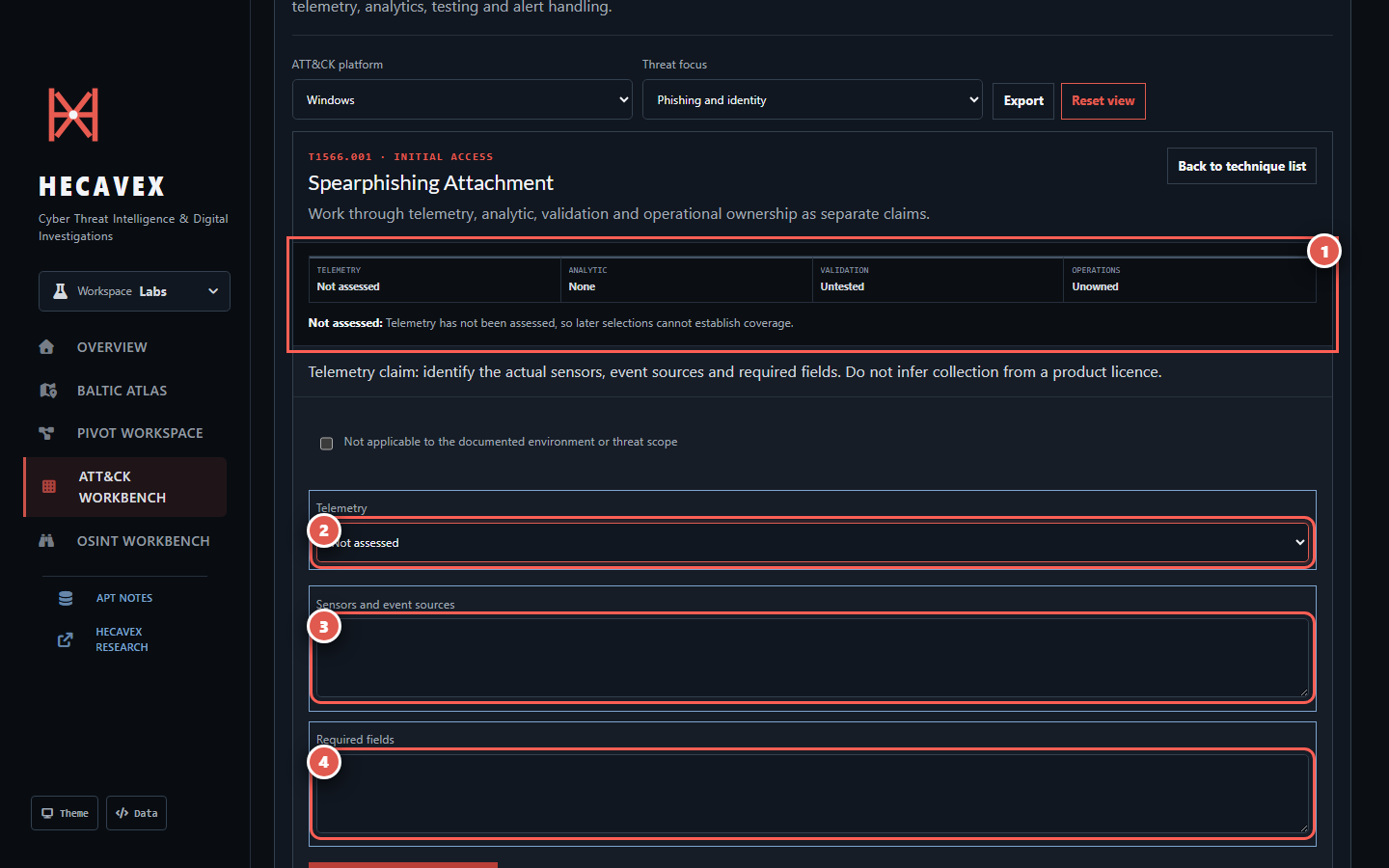
Capability editor with aggregate progress marked 1, telemetry state marked 2, sensors marked 3 and required fields marked 4
The editor deliberately separates evidence of collection from the existence of an analytic, a successful test and operational ownership.
  1. Aggregate stateThe summary shows telemetry, analytic, validation and operations separately, then explains the derived state.
  2. Telemetry stateUse Absent only after checking the documented environment. A licence or agent installation is not evidence that required events arrive.
  3. Sensors and event sourcesName the actual mail gateway, EDR, identity, proxy, DNS or other collection source.
  4. Required fieldsRecord the fields needed to correlate the behaviour. Continue through analytic, validation and operational stages using the step bar.

Neutral

Not assessed

No one has yet established whether the telemetry exists. Later selections cannot establish coverage.

Gap

No telemetry

The required collection was checked and recorded as absent. This is a real capability gap, not a default.

Progress

Telemetry or analytic available

Collection or an analytic exists, but the later claims remain incomplete. Keep each claim separate.

Outcome

Validated or operational

Validated requires a representative test. Operational additionally requires an assigned, tested alert-handling path.

Explore intelligence: reference data is not attribution

The directory covers every active official Enterprise ATT&CK group. A smaller, explicitly marked HECAVEX-reviewed layer exists only where source-by-source review has been performed.
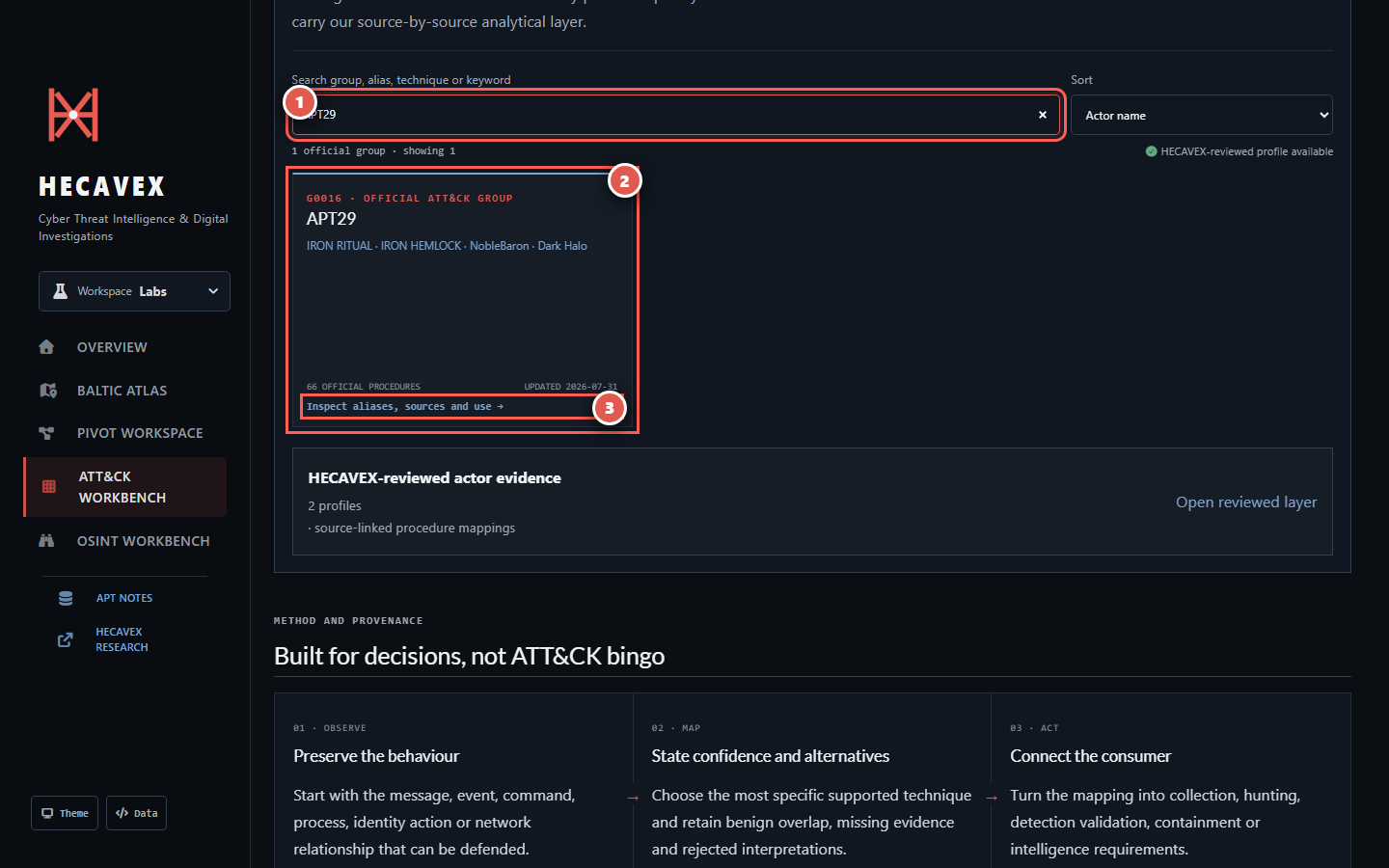
Threat actor search with the search field marked 1, APT29 official record marked 2 and Inspect action marked 3
Search accepts actor names, aliases, MITRE group IDs, technique names and procedure text.
  1. Search broadlyTry a public actor name, vendor alias, group ID such as G0016, technique ID or behaviour keyword.
  2. Check the record boundary“Official ATT&CK group” means reference data. “HECAVEX reviewed” means a separate reviewed evidence layer is also available.
  3. Inspect before usingOpen aliases, source context and procedures rather than copying a group-to-technique list directly into a report.
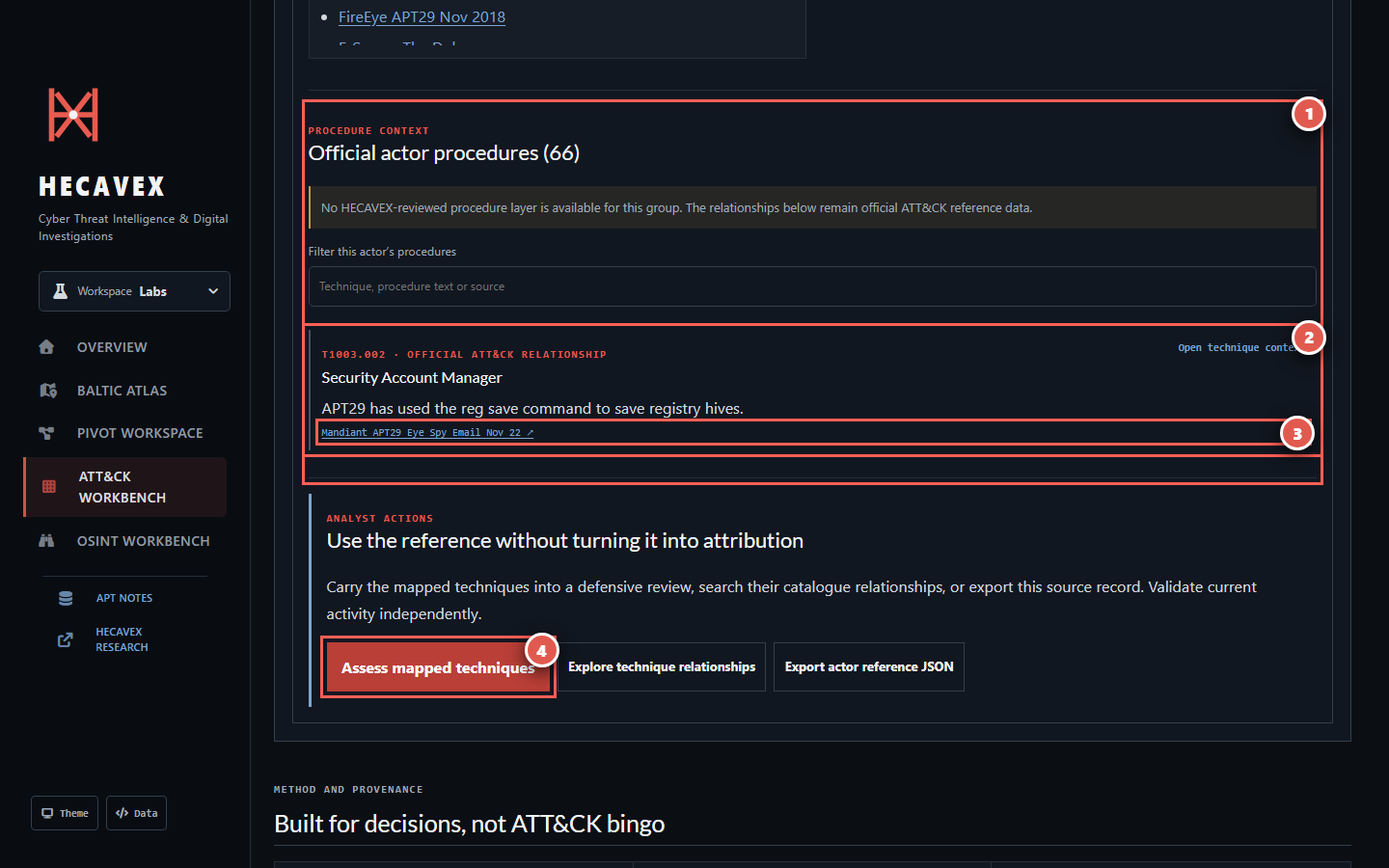
APT29 official procedures with the procedure boundary marked 1, procedure marked 2, source link marked 3 and Assess mapped techniques marked 4
The screenshot shows an excerpt from APT29's official procedure list. Procedure descriptions and citations come from the official ATT&CK dataset.
  1. Read the boundaryThe header says whether a HECAVEX-reviewed layer exists. Absence of that layer does not invalidate official data; it limits our own analytical claim.
  2. Read the procedureA technique ID alone is too broad. The procedure text states the publicly reported behaviour.
  3. Open the citationUse the linked source to inspect date, scope and wording before relying on the relationship.
  4. Carry it into a decisionAssess mapped techniques for defensive readiness, explore relationships, or export the actor reference. Validate current activity independently.

The four rules that prevent bad ATT&CK work

These boundaries apply no matter which workflow you use.

Candidate ≠ finding

A search result becomes an assessment only after evidence, gaps, alternatives and confidence are recorded.

Official group ≠ current attribution

A historical public relationship does not prove the same actor caused the event in front of you.

Detection package ≠ deployed rule

An engineering candidate still needs local schemas, logic, tests, tuning, ownership and lifecycle controls.

Technique count ≠ maturity

Fewer validated, operational capabilities are more useful than a large matrix of unsupported green boxes.

Your first useful session should end with:

  • A clearly named environment, case or intelligence question.
  • A distinction between observed, derived, suspected and confirmed claims.
  • At least one source, telemetry requirement or validation question that another analyst can inspect.
  • An exported record when the work needs to leave this browser.